Made for vinyl DJs · CDs welcome · no streaming

Drop the needle.
It does the rest.

Runs by itself beside your turntables. Hears every record, handles the requests, shows how the room reacts.

Get started Bring it to your venue

Your records. No streaming. No app for guests. Free during the pilot.

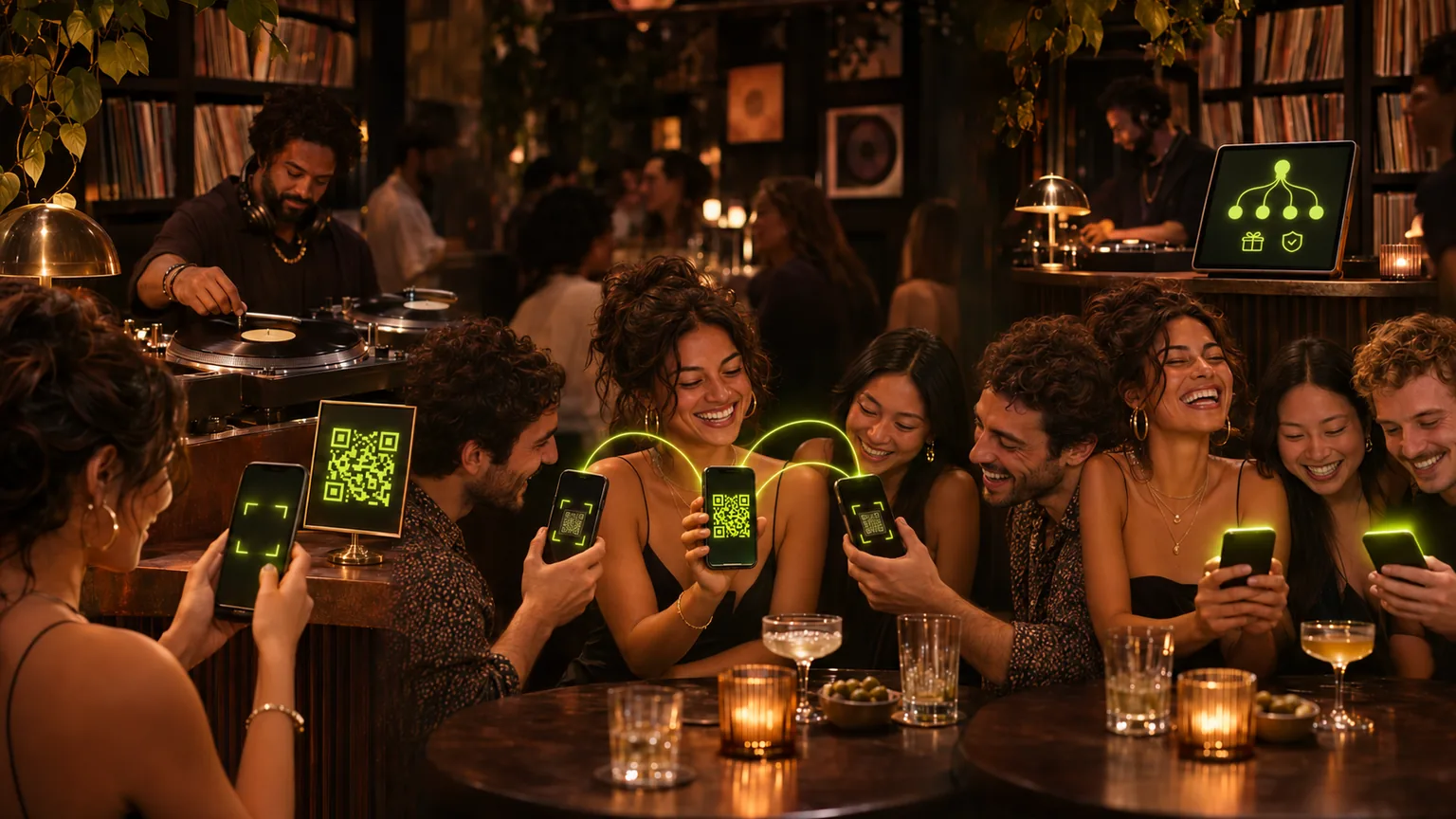
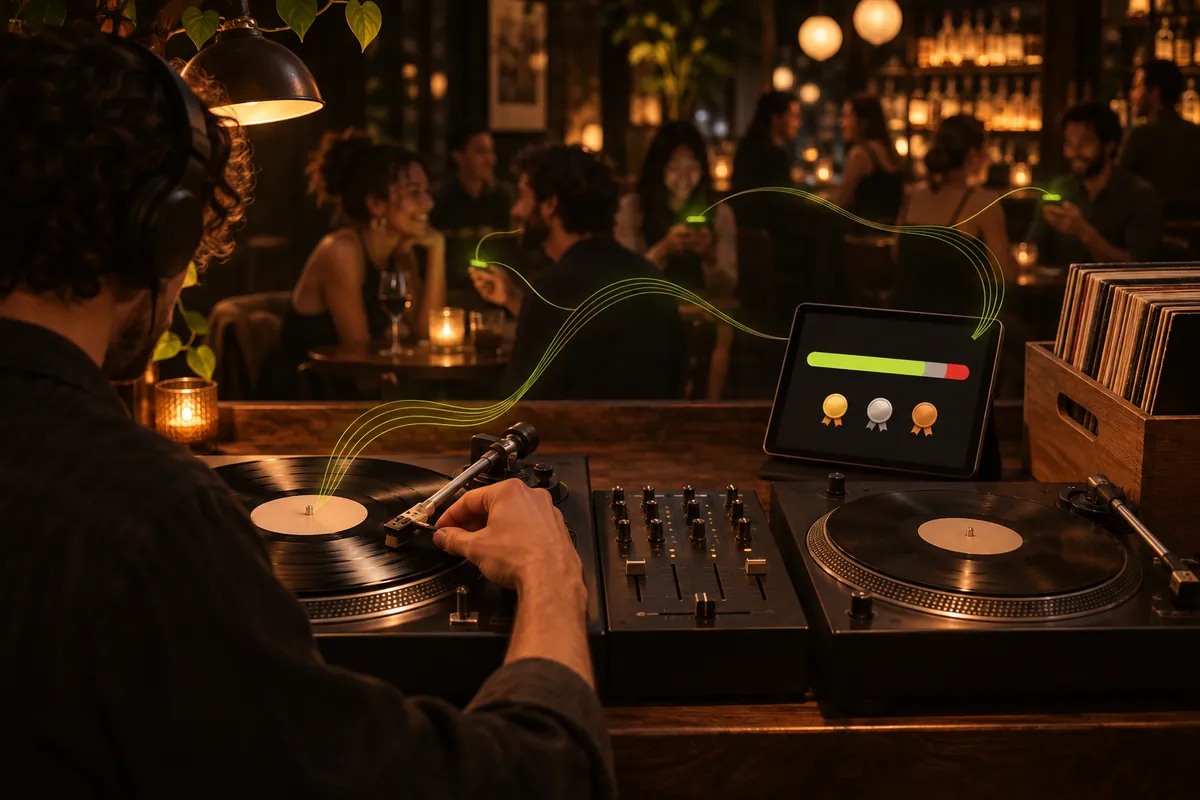
A vinyl DJ lowers the needle while guests in the bar react on their phones; lime sound lines flow from the record to the phones and back to a tablet showing the room's mood and the next three requests

Easy to start

Minutes to set up. Nothing to run.

↥
List only what can be requested
Just tonight's request list, not your whole collection. Import a file or reuse last night's.
▦
One QR code and go
Pick a date, choose a list, and show the official code at the DJ booth, bar or entrance. Guests can share it from their phones.
◉
Hears through the tablet's mic
No cables to the mixer. The DJ app listens at the booth.
✓
Free during the pilot
Guests use free credits. No real money, no pay-to-play.

Or skip requests altogether. Switch the gig to feedback only, just play, and the room's likes still show you how the night is going.

One tool, many nights

Wherever music plays to people, the room can have a say.

Six situations, one idea. Guests join with a QR code. Requests and reactions flow to whoever runs the music: a DJ today, or the venue itself in a later mode.

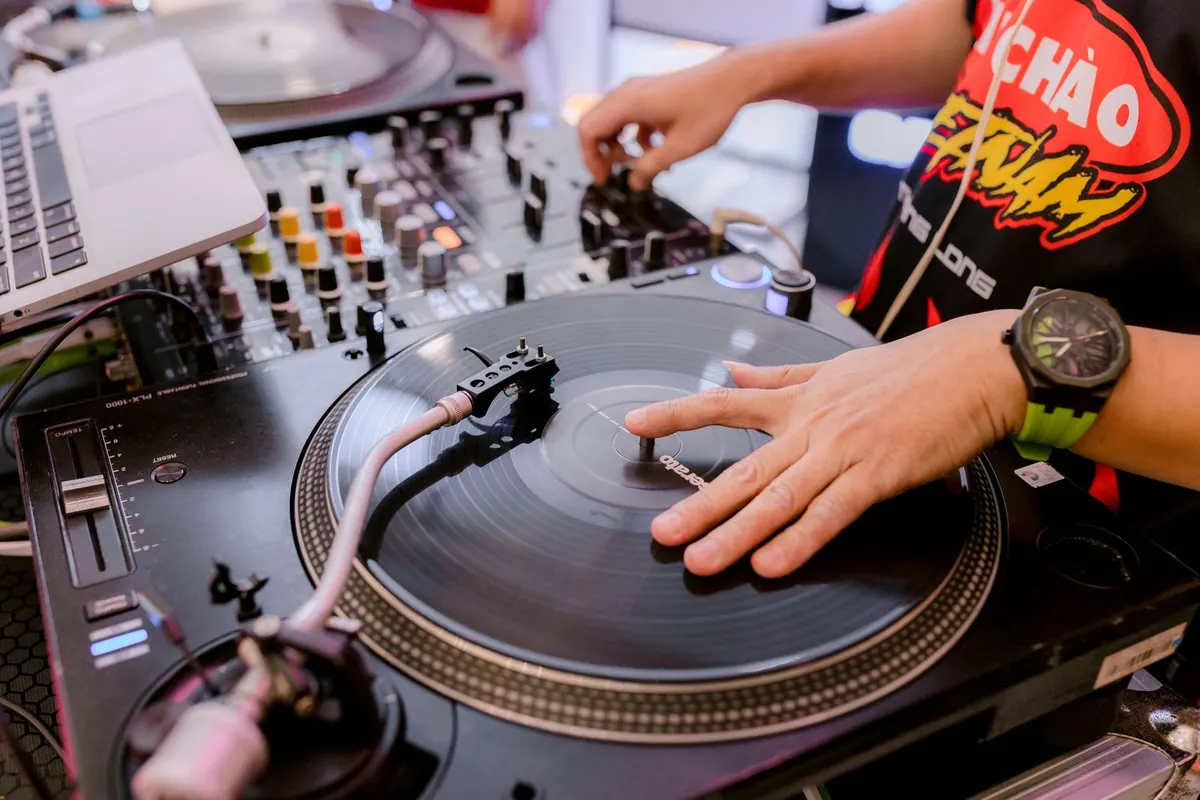
A DJ's hand on a vinyl record on the turntable
● LIVE · DJ VIEW
● Now playingListening
Trains
Porcupine Tree · from vinyl
👍 75 % · 😐 17 % · 👎 8 %
Locked trio
🥇
Blackest Eyes
1 requester · 7 supporters
○ Not played
Live nowDJ Live mode

Vinyl club night

Friday, 23:40. The DJ has two crates of records, a wallet of CDs and a room that is just warming up. Requests come only from what's in the bag, so nobody asks for something that isn't there. Recognition hears the needle drop or the CD start and puts the track on everyone's phone. No laptop or streaming service needed. The DJ glances at the reactions and picks the next record.

1The request catalog matches the record bag
2Audio recognition follows turntables and CD players
3The DJ locks the next three, or lets auto-fill do it

Live nowDJ Live mode · first venue: Beer Garden, Hikkaduwa

Beach bar & beer garden at sunset

Sunset on the coast of Sri Lanka. Tables in the sand, string lights coming on, a DJ by the bar. A crowd like this is mixed: travellers from a dozen countries, locals, friends who came for one drink. One guest scans the official code from the DJ, the bar or the entrance and shares the gig from their own phone, so the rest of the table is in within seconds. Most back someone else's request rather than make their own, and the DJ sees which way the crowd leans as the sun goes down. Beer Garden in Hikkaduwa is where Play My Song Here starts.

1Scan the official code, then share the gig from your phone
2Guests support favourites across the garden
3The DJ follows the mood from sunset into the night
The DJ getsA wide, quiet crowd made readable.
The venue getsGuests who stay for one more round of songs.
A beachside bar crowd at sunset under palm trees
● LIVE · GIG IN PROGRESS
10 cr · Guest
Beer Garden
Requests
Track or artist
Valerie
Amy Winehouse
♡
+1+2+4
Sunny Afternoon
The Kinks
Request
Bring your table in
Share the gig with a friend
Share
TonightRequestsMy requestMe
Guests dancing at an outdoor wedding under string lights
● LIVE · GIG IN PROGRESS
Aino & Ville
tonight
Join the gig
Nickname
Uncle Pekka
Join with nickname
Tonight's requests
Dancing Queen
ABBA · 11 supporters
♡
Live nowAd hoc gig

Private party & wedding

A hired DJ or a friend with a box of records, a one-off night, three generations on one dance floor. Whoever plays names the gig on the way in, and the official code stays with the DJ or at the entrance. Grandparents and teenagers join through friends at their table, ask from the same list, and rally behind the songs that matter. No more requests shouted over the speakers at midnight.

1Name the gig on your phone and you're live
2One guest gets the official code and shares the gig with their table
3Every age group gets heard; whoever plays keeps the flow
Live nowDJ Live mode · recurring

Weekly bar night

Every Thursday, the same corner, the same DJ, many of the same faces. One night tells you little. Ten nights tell you a lot. The after-gig reports build up: which tracks warm the room, which cool it, what regulars keep asking for. The DJ sharpens the bag and the bar learns what its Thursdays sound like.

1A fresh gig code at the bar for every Thursday
2Reactions and requests are saved per gig
3Reports show what works, gig by gig
The DJ getsA record bag shaped by real reactions.
The bar getsA night with a sound its regulars helped build.
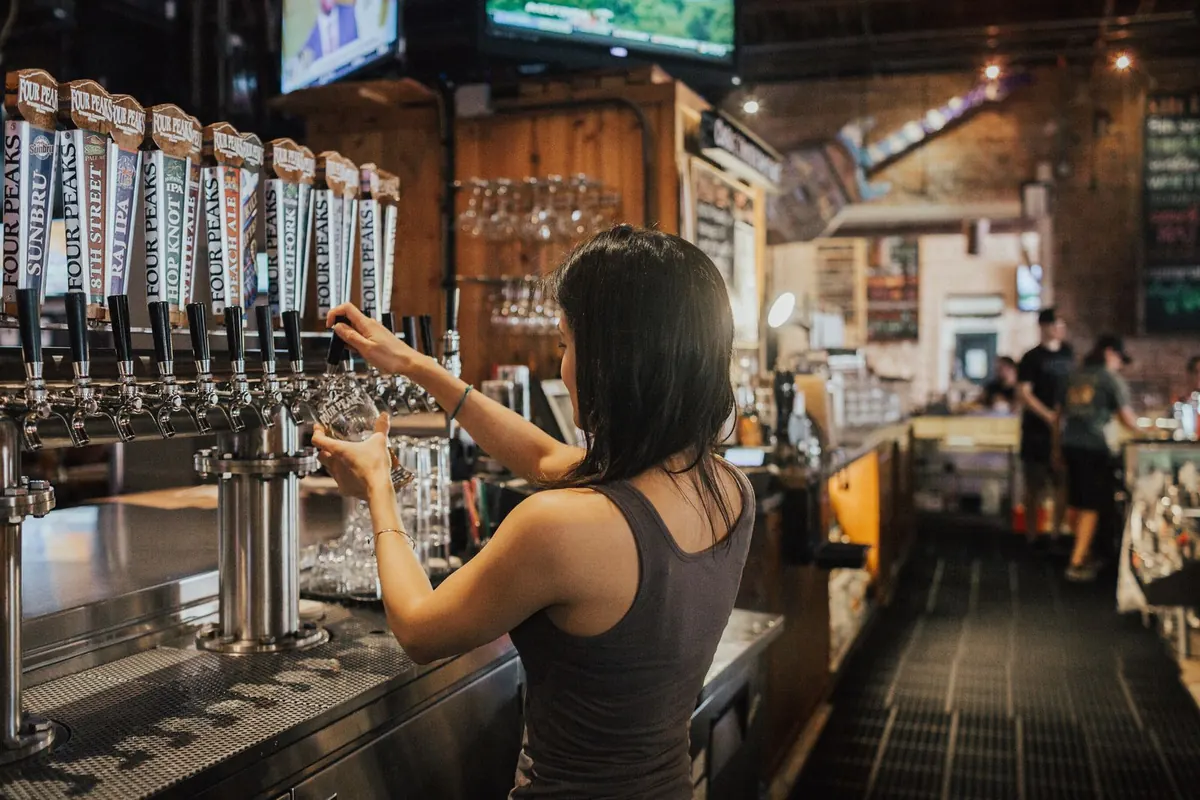
A bartender pours draft beer in a busy pub
THE STORY OF THE NIGHT
Gig report · 10 Thursdays
Warms the room
Superstition
Stevie Wonder
👍 ↗
Most asked
Pump It Up
Elvis Costello
★
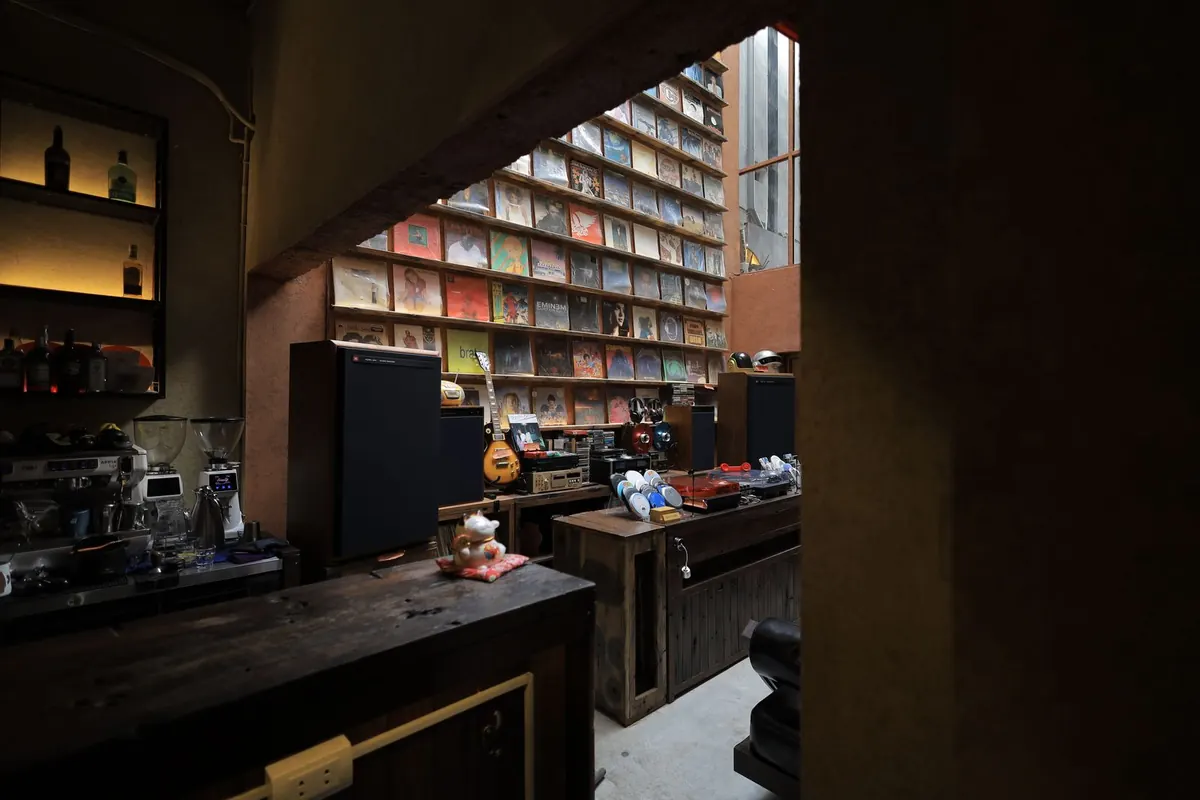
A listening bar with a wall of records, large speakers and turntables
● LIVE · GIG IN PROGRESS
10 cr · Guest
Listening bar
● Playing right now.
Kind of Blue
Miles Davis
👍–👎
Only the DJ can see this · You can change your vote
Your requests
A Love Supreme
John Coltrane · 3 supporters
○ Not played
TonightRequestsMy requestMe
Live nowDJ Live mode · the owner is the DJ

Jazz kissa & listening bar

A small room built around the sound system and a wall of thousands of records. Nobody can see what's on that wall from their seat, and nobody shouts across a listening room. Now the whole collection is on the guest's phone. Someone finds that rare pressing they never expected to hear on a real system and asks for it quietly. Others back it. The owner decides when it goes on, and recognition shows every guest what is on the platter. On a pure listening night, switch the gig to feedback only and the hearts keep coming.

1The whole record wall becomes the request list
2Guests ask for the rare one, or back someone else's find
3The owner picks the moment; every phone shows what's playing
Coming laterVenue mode

When the bar plays it

Not every night has a DJ. On a quiet Tuesday the bar can still let guests take part: the venue sets the house list and the rules, and guests request and react within them. The bar keeps control of its sound, and the room still gets a say.

1The venue chooses the list and the limits
2Guests request and react, just like a DJ night
3DJ nights and no-DJ nights use the same guest flow
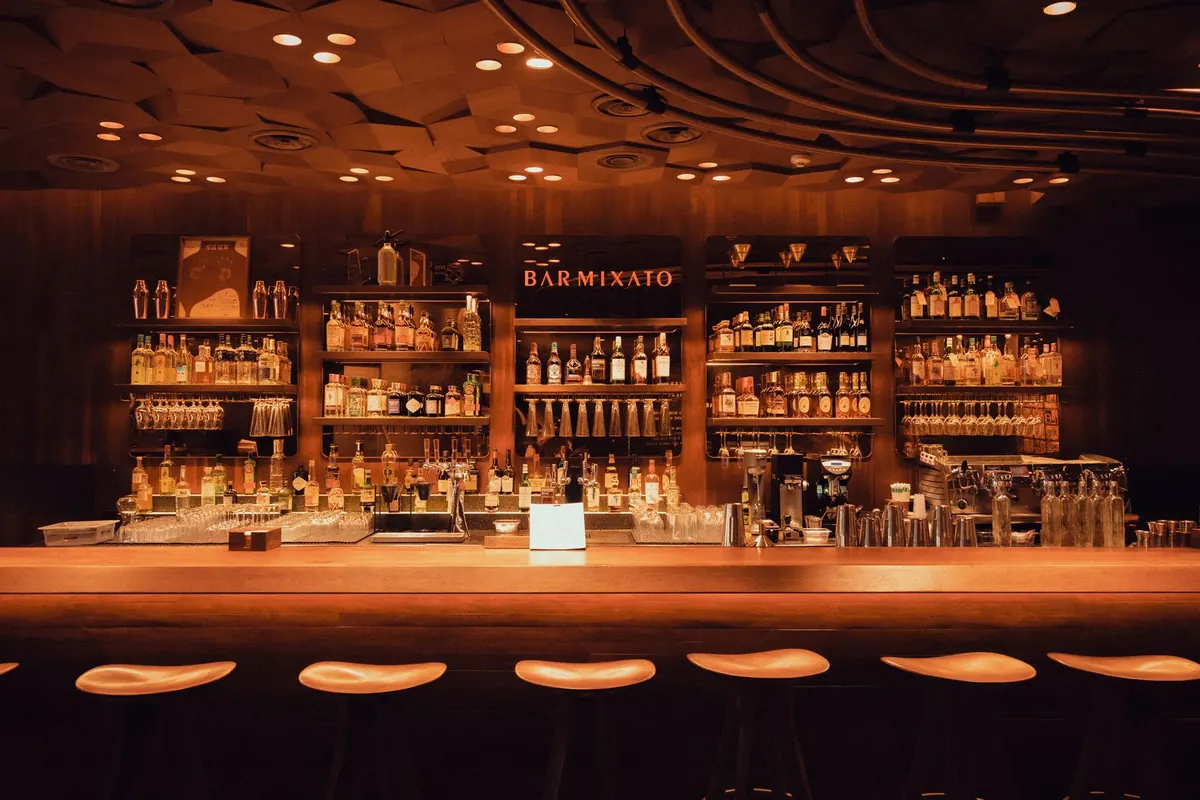
A warmly lit, quiet bar counter in the evening
● LIVE · VENUE MODE
10 cr · Guest
The Corner Bar
Up next in the room
From the house list
set by the venue
Your pick
waiting its turn
Soon
TonightRequestsMy requestMe

Works while you play

Nothing to babysit. Everything to read.

Set it up, drop the needle, play. Look when you want.

How it works. 01 Your records: vinyl first, CDs too, no streaming. 02 It listens and runs by itself: names every record, fair turns, refunds, picks the next three. 03 Guests join with a QR code, no app: ask for a record, back a favourite, react to each track. 04 You glance at the room mood and the next three, and you pick the record. 05 Every night shapes the next crate.

Tonight's set

Change course mid-set.

See how the room reacts while the record spins.

Your next gigs

Every night shapes the next.

Every night leaves a report. Build the next crate from it.

The same three steps, every time

From a request to a shared moment.

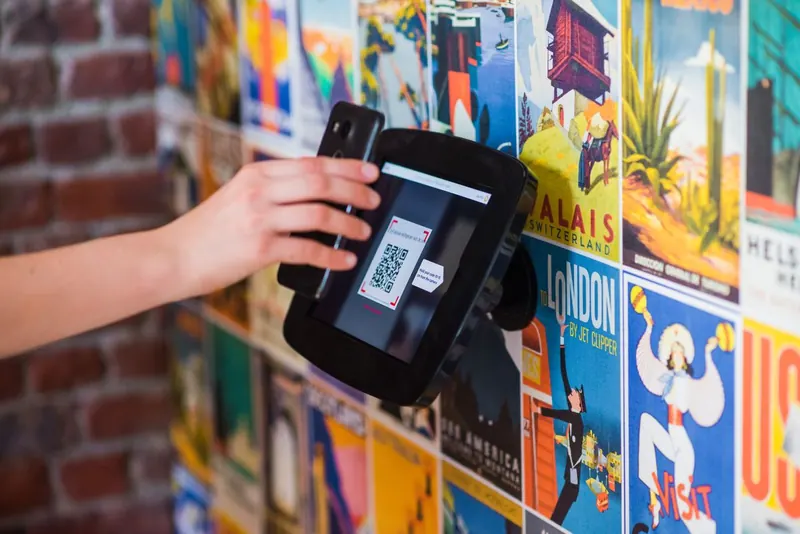
A hand scanning a QR code with a phone
01

Join

Scan the QR code, or open the code a friend shares with you, and join with a nickname or email. No app to install.

Two friends choosing a song together on a phone
02

Request

Pick from the DJ's collection or back someone else's favourite. The DJ chooses what plays.

A crowd raising their hands under stage lights
03

React

Show what moves you. The DJ sees how each track lands, not just what people ask for.

How credits work

A little say, shared fairly.

A starting balance
Guests who join get credits to start with. The DJ can reward a guest with more.
Request or back
Put 1, 2 or 4 credits on a track. The more the room puts behind it, the higher it climbs.
Never lost for nothing
Rejected or blocked requests are refunded. On feedback-only nights, credits stay out of it.

Free during the pilot: credits are test credits and no real money is involved.

Bring your table in

One scan. The whole table.

One guest scans the official gig code from the DJ, the bar or the entrance. They share the gig from their own phone, and friends are in within seconds. You still know exactly who came in how.

Three connected moments in a vinyl bar: a guest scans the official code at the DJ booth, shares the gig with friends, and the DJ sees the invitation group

One guest gets the official code

The QR code can stay with the DJ, at the bar or by the entrance.

They bring in the whole table

The guest shares the gig from their phone. Friends join through that personal invitation.

You keep the invitation trail

See who brought whom, reward the inviter, or warn and block one guest or their whole group.

Other guests never see who invited whom. Closed event? Turn sharing off for the gig.

The best part

And then
your song comes on.

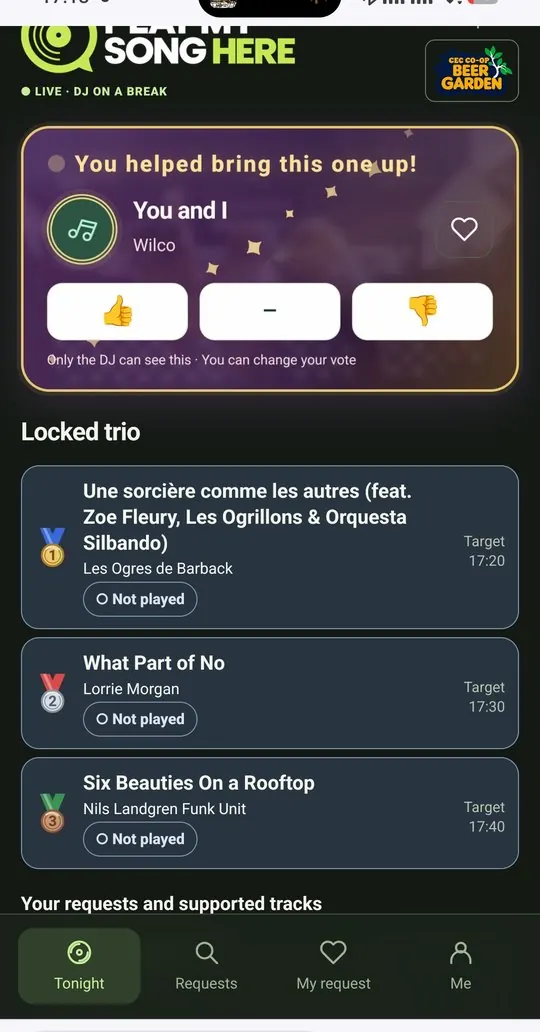
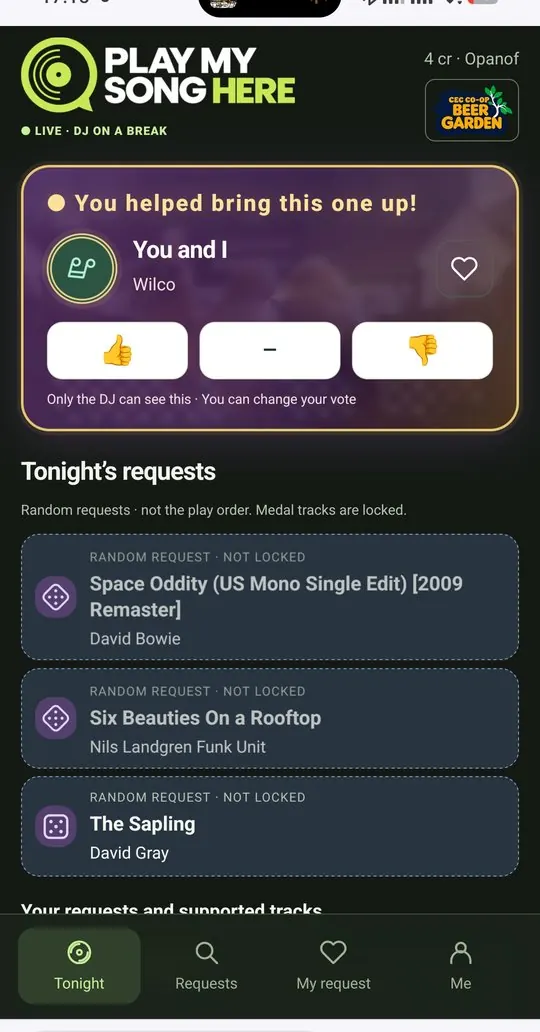
The moment a request hits the speakers, everyone who asked for it or backed it gets told on their phone: you helped bring this one up. The track shows up as playing now, and the vote buttons are right there.

♪
Shared credit
Not just the requester: everyone who backed the track gets the moment.
♪
Right on the Tonight tab
"Your track is playing!" appears wherever you are in the app.
Guest view: You helped bring this one up! You and I by Wilco is playing, with thumbs up, neutral and thumbs down buttons, and the locked trio below

Getting there

A little game on the way to the dance floor.

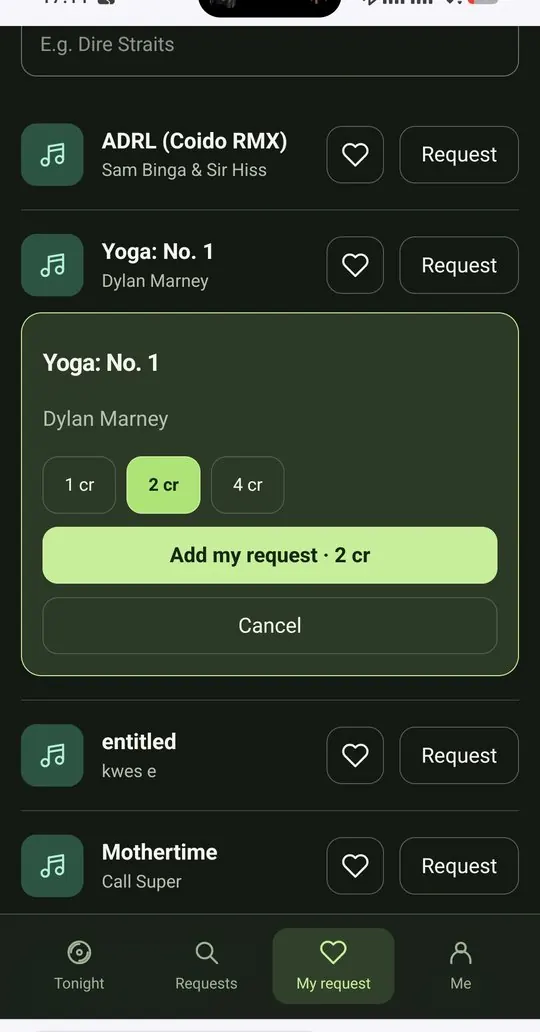
Guest view: requesting Yoga: No. 1 by Dylan Marney with a choice of 1, 2 or 4 credits01

Choose how much it matters

Put 1, 2 or 4 credits on your request. More credits, higher in the queue.

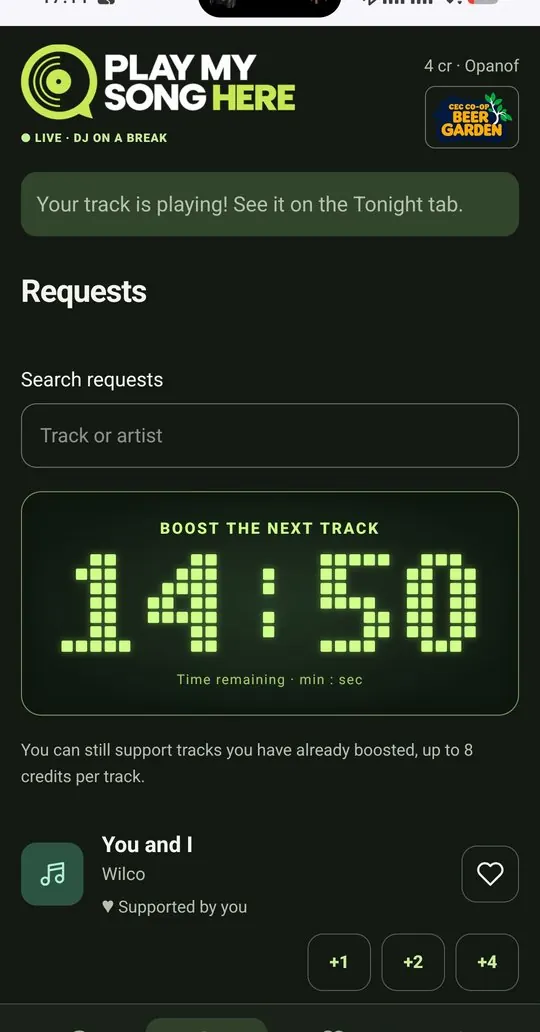
Guest view: Boost the next track countdown showing 14:50 remaining, and supporting tracks with +1, +2 or +402

Boost the next track

A countdown shows how long backing stays open before the next trio is picked.

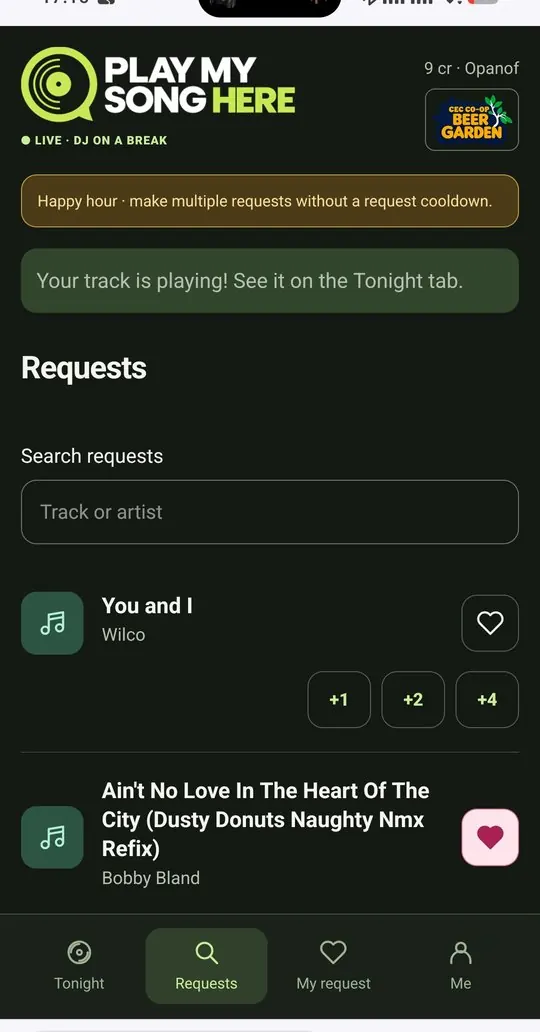
Guest view: Happy hour banner saying make multiple requests without a request cooldown03

Happy Hour

When the DJ turns it on, everyone can make several requests in a row.

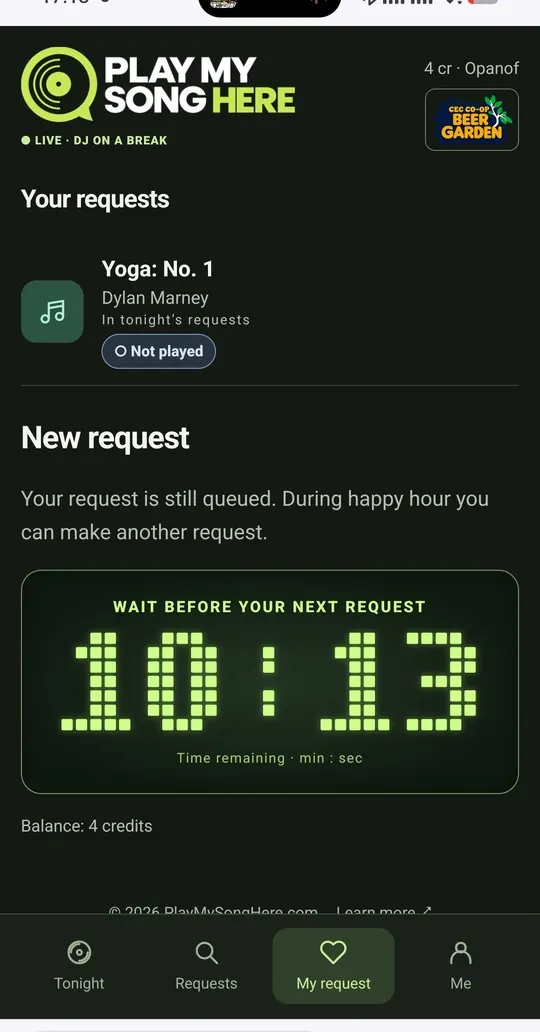
Guest view: Wait before your next request countdown showing 10:13, with the guest's queued request04

Your turn comes again

A clear countdown to your next request keeps it fair for the whole room.

Guest view: Tonight's requests shown as random requests, not the play order, with dice icons and the label not locked

No leaderboard to game

Everyone sees what's wanted. Nobody sees who's winning.

Tonight's requests roll past in random order, never in the play order. Guests can see what the room is asking for and back what they like, but nobody can tell which track is ahead. So there's no visible race to the top and nobody can simply target the current leader. Only the three medal tracks the DJ has locked are certain.

?
Random, not ranked
The ranking stays with the DJ. Guests back the music, not a scoreboard.
♪
In the end, the DJ decides
Requests and backing show what the room wants. In the end, the DJ decides what plays and when: any request can be locked, held back, or rejected and refunded.

Real screens from the app

One night,
two screens.

Guests hold the night in their hand. The DJ sees the whole room on a tablet beside the decks. These screens are from a test evening at our first venue, the Beer Garden in Hikkaduwa.

GuestIn the phone's browser, no app to install
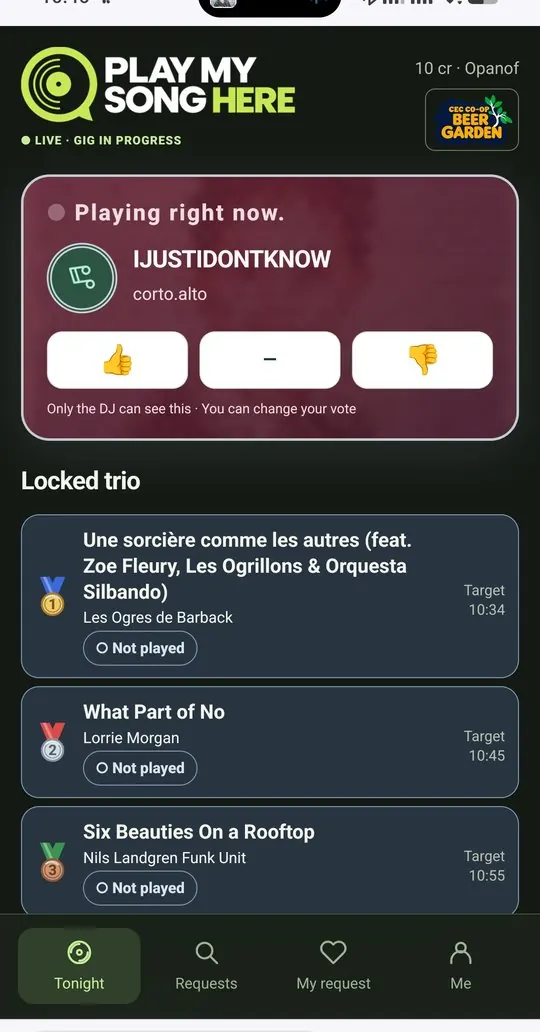
Guest view: the track playing right now with thumbs up, neutral and thumbs down buttons, and the locked trio of next tracks01

Vote on what's playing

Thumbs up, neutral or down. Only the DJ sees it, and you can change your mind.

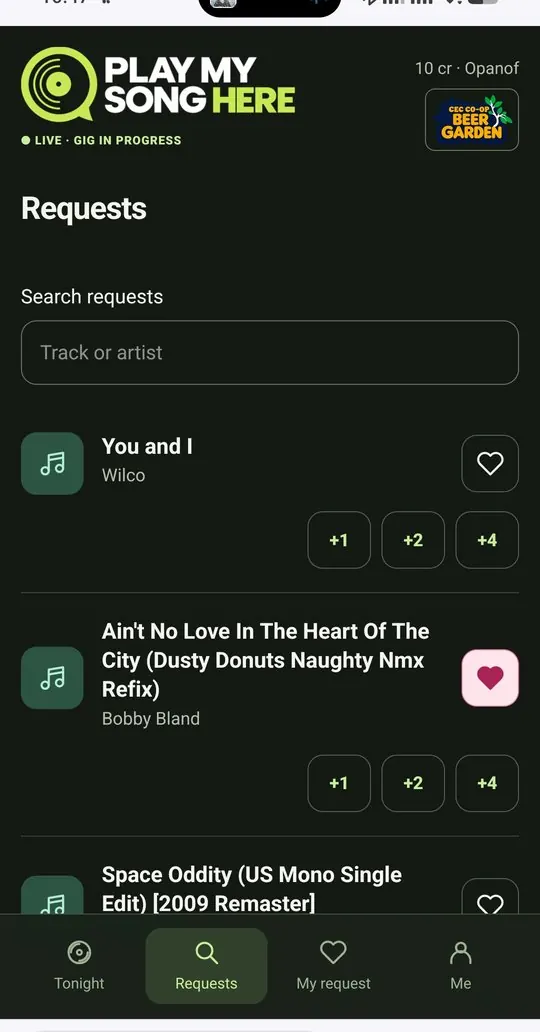
Guest view: searching the DJ's collection with request buttons and +1, +2 and +4 support buttons02

Request or back a favourite

Search the DJ's collection, ask for a track, or push someone else's up the list.

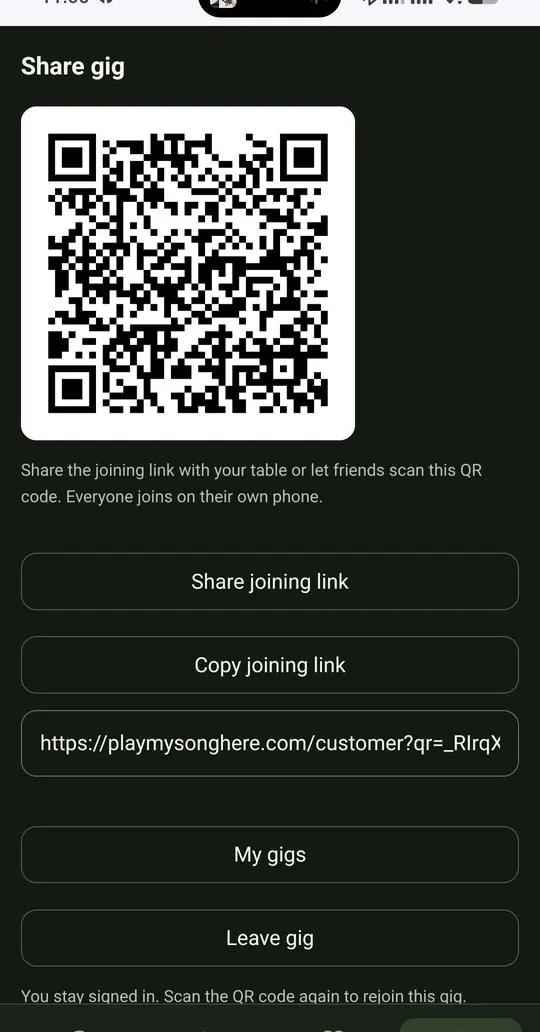
Guest view: share gig screen with a QR code, share joining link and copy joining link buttons03

Bring your table in

Show your personal QR code or send the link. Friends join on their own phones.

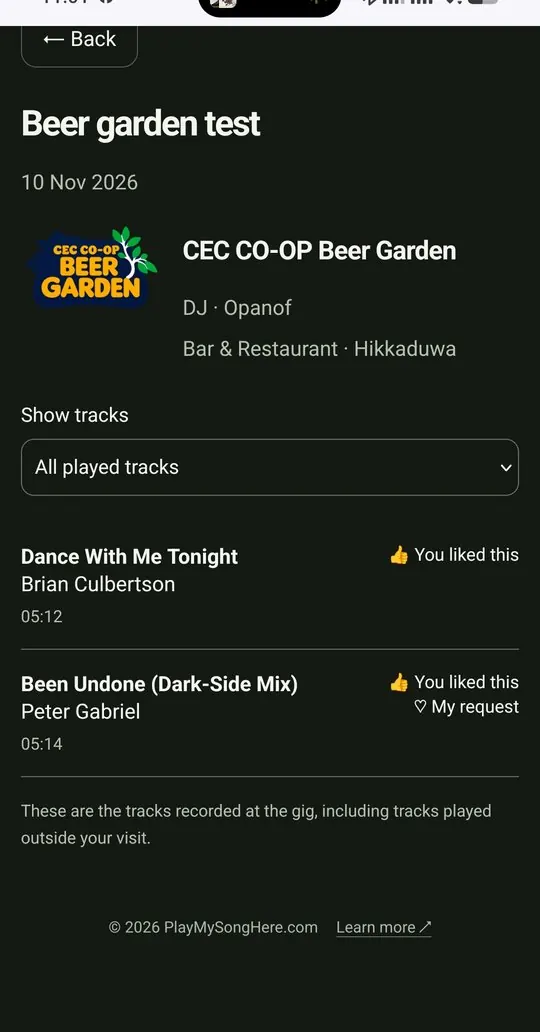
Guest view: a past gig at CEC CO-OP Beer Garden, Hikkaduwa, listing played tracks and the ones the guest liked04

Keep the night

Every gig you joined, every track played, the ones you loved.

DJThe Android app on a tablet next to the decks
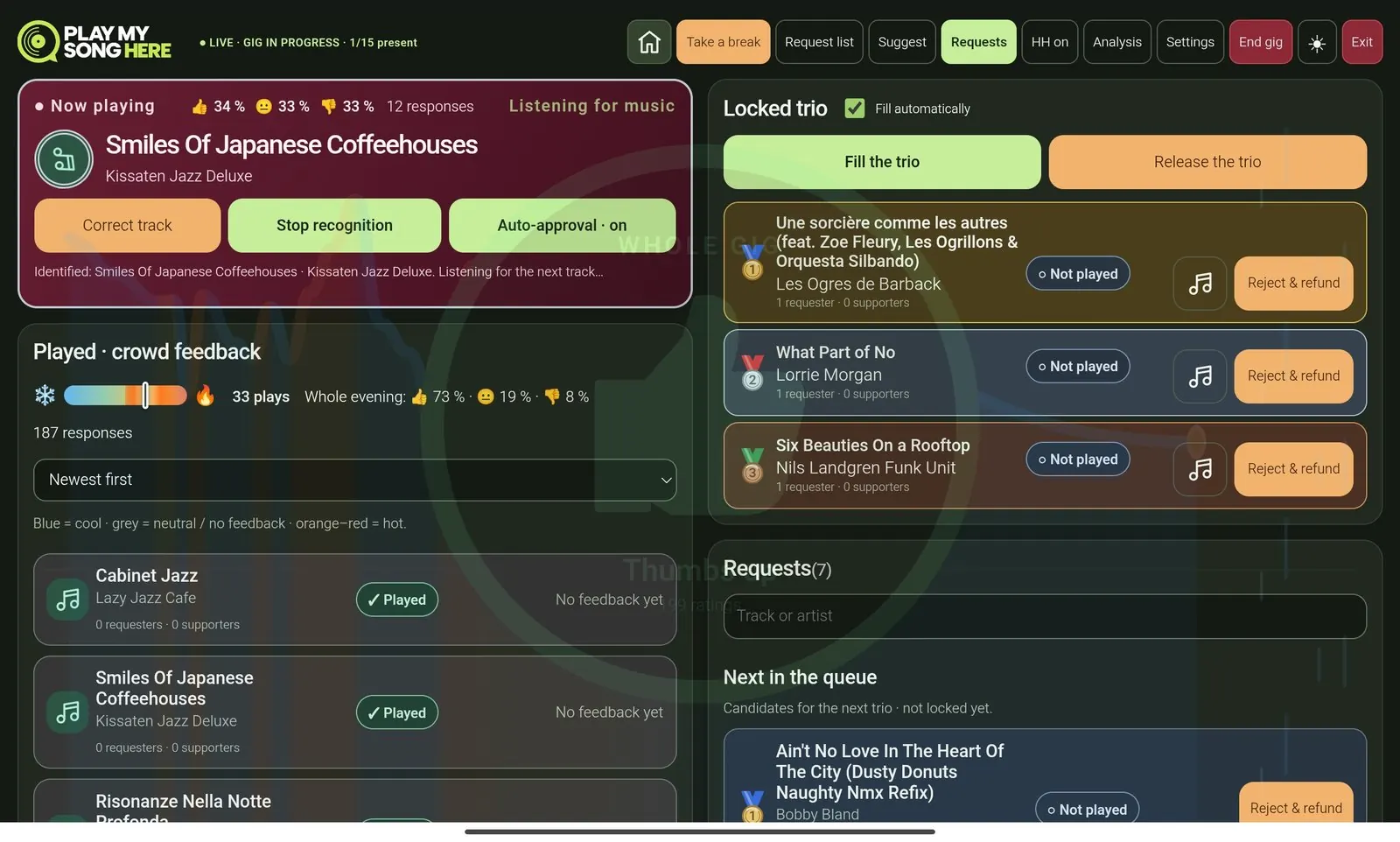
DJ live view: now playing identified by recognition with live mood percentages, played tracks with crowd feedback, the locked trio and the request list
1
Live mood
Every vote moves the room's mood while the track is still playing.
2
Recognition
The app hears the record or CD and names it. Correct it with one tap.
3
Crowd feedback
Each played track turns cool or hot. The whole evening at a glance.
4
Locked trio
The next three requests, locked by the DJ or filled automatically. Guests see them coming.
5
Requests and queue
Everything the room asks for, ranked by how many back it.

Your gig, your rules

Whoever runs the gig sets the rules.

Works out of the box with sensible defaults. Change only what you want, for each gig in advance. A wedding can take every request. A jazz kissa can run on feedback only. A busy beach bar can slow requests down.

Requests and feedback, or feedback only
A listening bar can run on hearts alone. Switching refunds open requests.
Request cooldown and boost window
How often one guest can ask, and how long backing stays open.
Happy Hour for requests
Lift the limits for a while: guests can make several requests in a row, with no cooldown in between. Made for the bar's own happy hour.
Repeat interval and plays per track
Keep the night from looping the same favourite.
Trio target time and warning
When the next three should play, with a heads-up before.
Its own lists for each gig
Pick a different DJ playlist and audience request list for every gig: the record wall, last week's set, or a list made for the night.
Guests can share the gig, or not
Turn friend invites on for a party, off for a closed event.
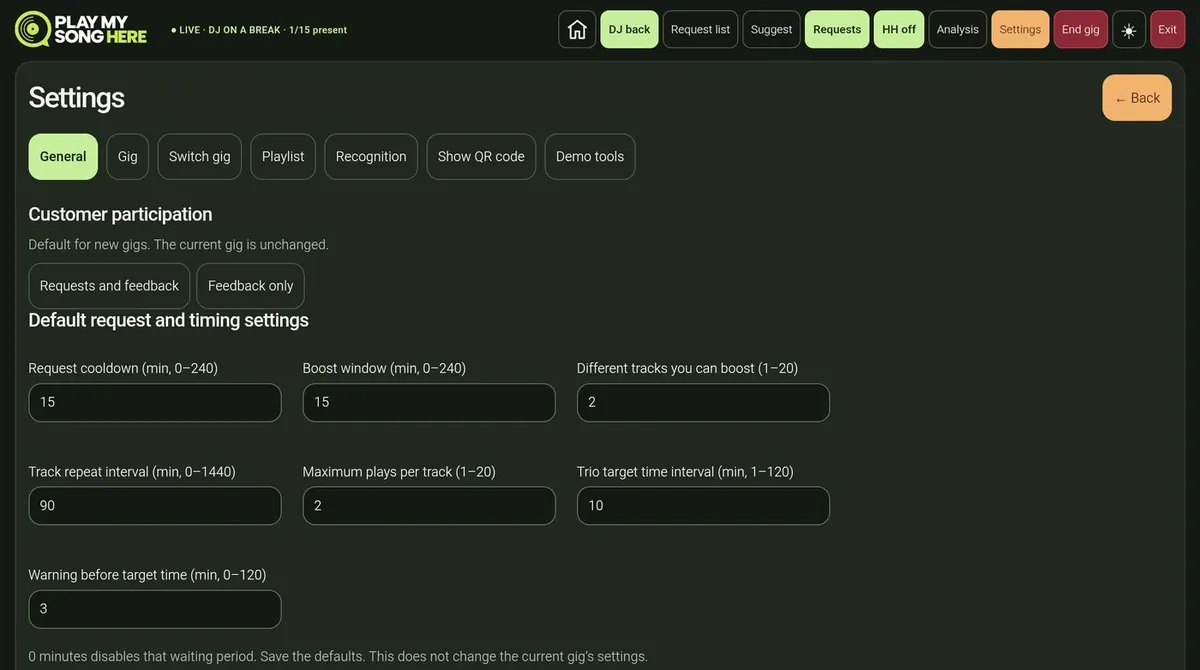
DJ settings, General tab: customer participation set to requests and feedback or feedback only, and default request and timing settings such as request cooldown, boost window, track repeat interval and trio target time
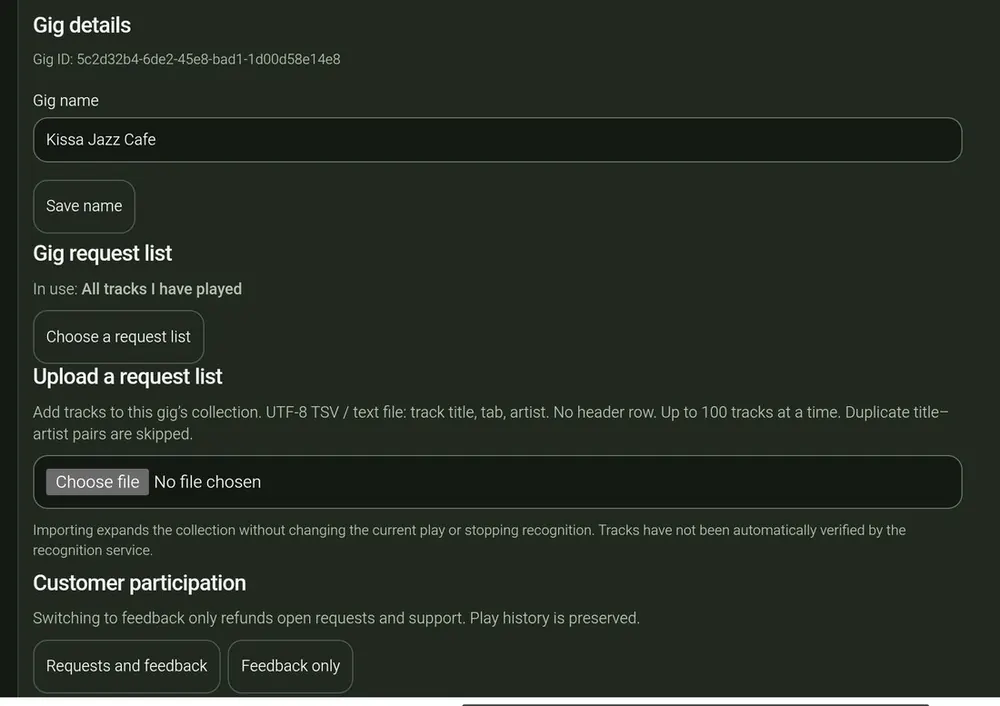
DJ settings, Gig tab: gig name Kissa Jazz Cafe, the gig request list, uploading a request list and customer participation for this gig

Know your crowd, by name

Reward the regulars. Calm the troublemakers.

Most nights you never need it. When you do, the DJ sees every guest in the room by nickname, with what they asked for, what they backed and how they voted. Good energy gets rewarded. Spam stops at the DJ.

1
Who's here right now
The list shows only guests connected to the gig at this moment. Anyone who goes quiet drops off after 60 seconds.
2
Who brought whom
Each card shows an official invitation or a friend invite, and how many people that guest invited. The first way in is locked for the gig.
3
Reward the room
Give a guest +1 or +2 credits: the one who filled a table, or the one who started the dancing.
4
Thumbs up, warn or block
Give a thumbs up for good vibes or a friendly warning. If needed, block one guest for this gig, or the whole group they invited.
5
Fair refunds
Blocked or rejected requests can be refunded, so nobody pays for a song that never plays.
Users● 16 here now
SunsetSam
Balance 8
Official invitation · invited 4
2 requests5 backed👍 12 · ➖ 2 · 👎 1
+1+2👍WarnBlock
Mika
Balance 10
Friend invite · from an anonymous guest
1 request3 backed👍 6 · ➖ 1 · 👎 0
+1+2👍WarnBlock
Table6Warned
Balance 0
Official invitation · invited 5
6 requests0 backed👍 0 · ➖ 0 · 👎 9
+1+2👍WarnBlockBlock group (5)

Illustration based on the DJ's Users view.

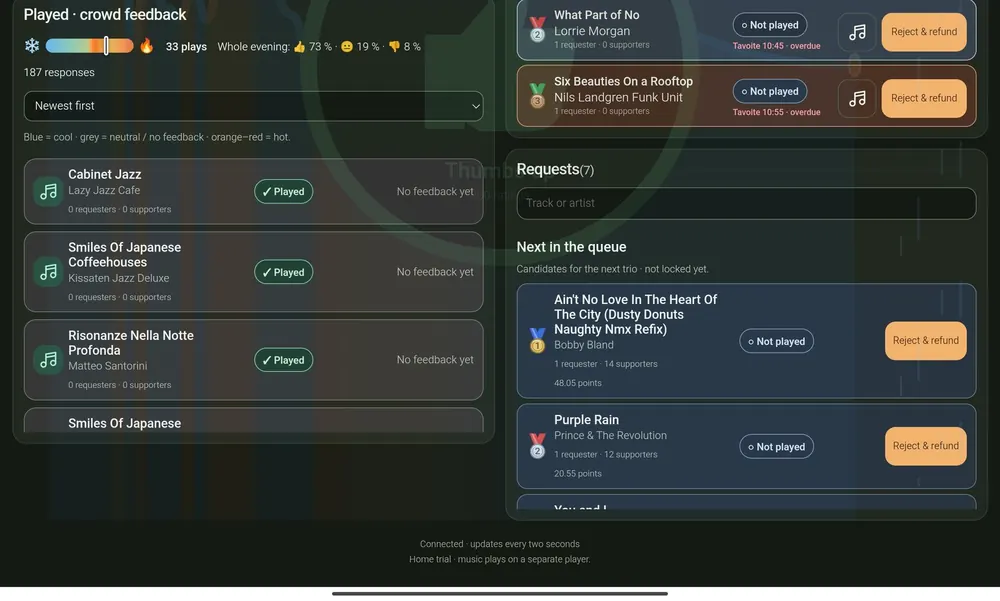
DJ view: played tracks coloured by crowd feedback and the queue of next requests with supporters and points

The queue, ranked by the room

Candidates for the next trio, with requesters and supporters. Approve or reject any of them.

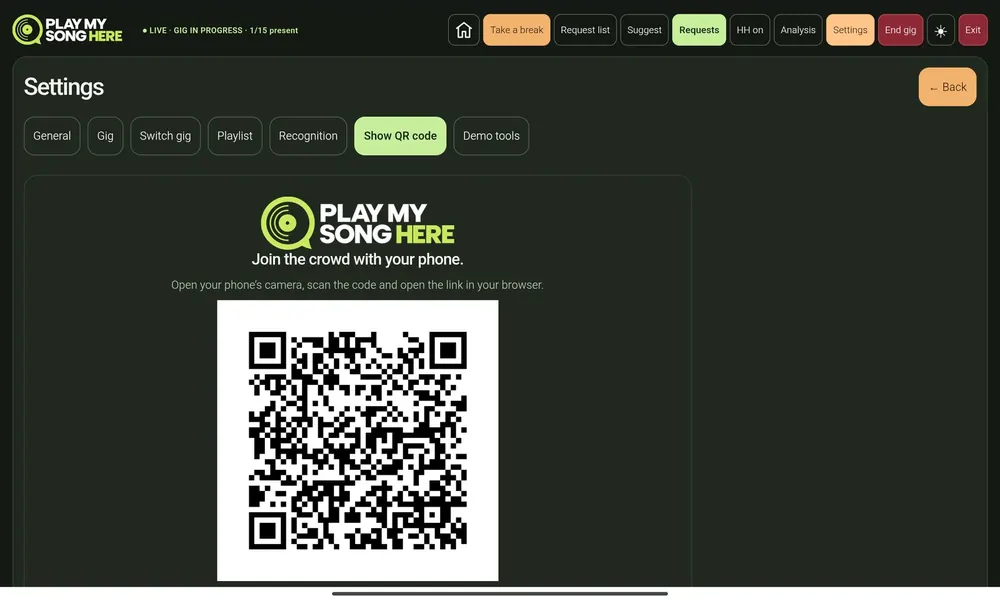
DJ settings: show QR code screen with the gig join code

The join code, on show

Turn the tablet towards the room, or show the official code at the bar or entrance.

From the event log Event log rows: song recognition identifies Freedom (Live) by Nina Attal, and auto-approval accepts Train Song by Holly Cole

Every moment on record

Recognition, approvals and feedback are logged as they happen, ready for the report.

The night doesn't end with the last track

See what worked.
Take it to the next gig.

The whole DJ dashboard also runs in the browser. Run the night from a laptop if you like, then open it the next morning to look back and plan the next gig.

playmysonghere.com/dj/live
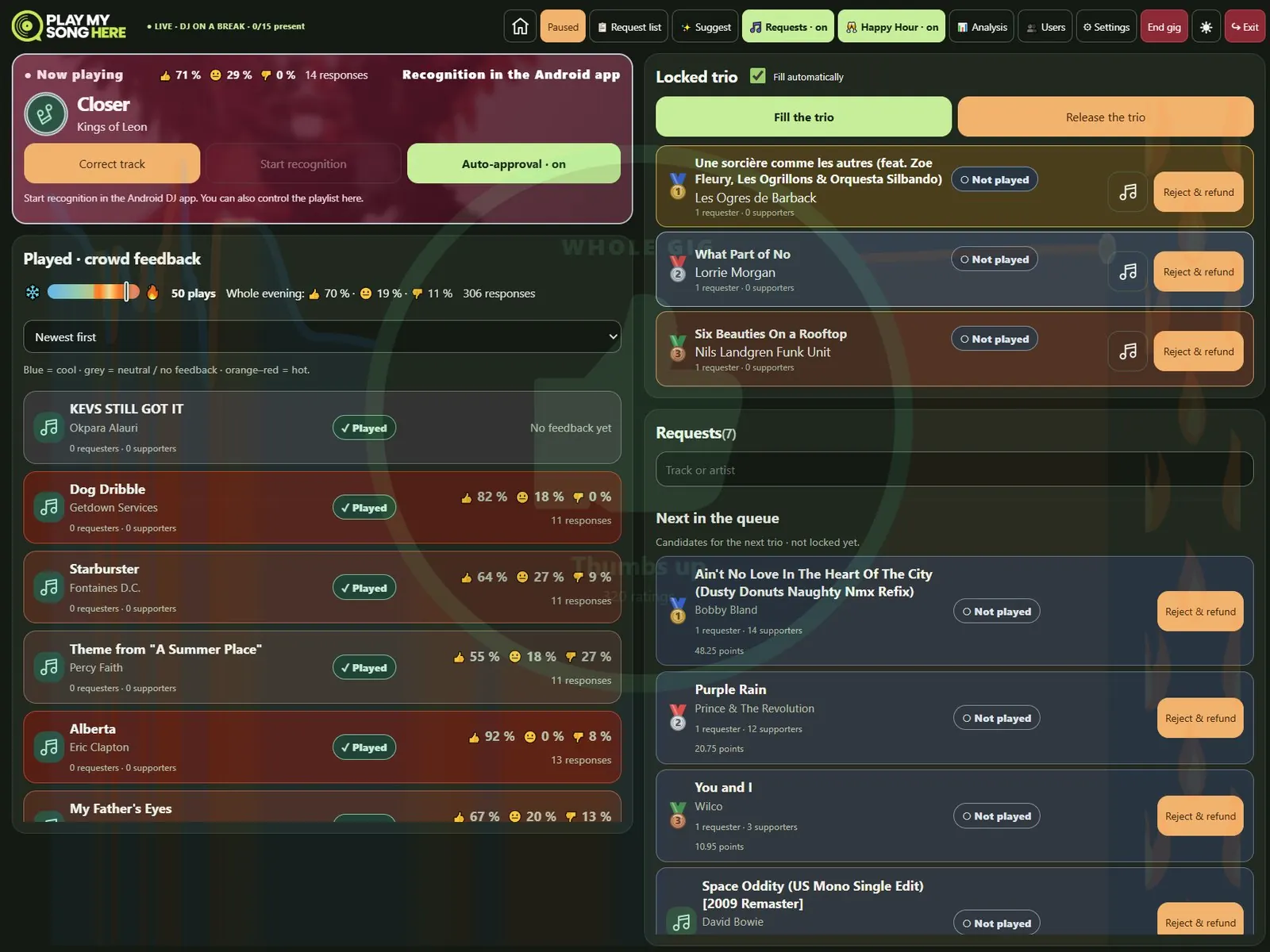
The DJ dashboard in a web browser in dark mode: now playing with live mood, played tracks with crowd feedback, the locked trio and the request queue
playmysonghere.com/dj/live
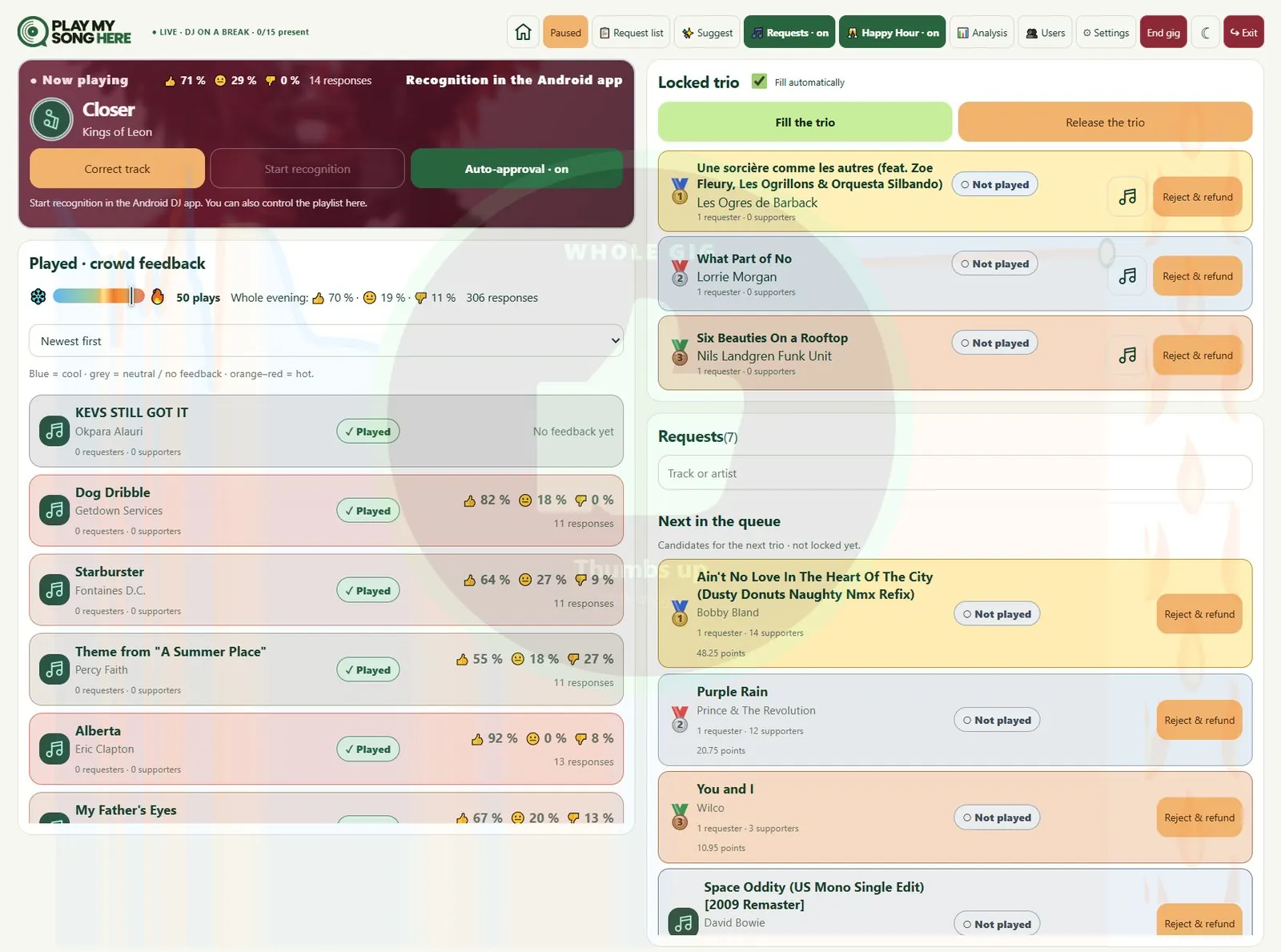
The same DJ dashboard in light mode
The live dashboard in a laptop browser, dark or light. Every played track shows how the room voted; the queue is ranked by support.
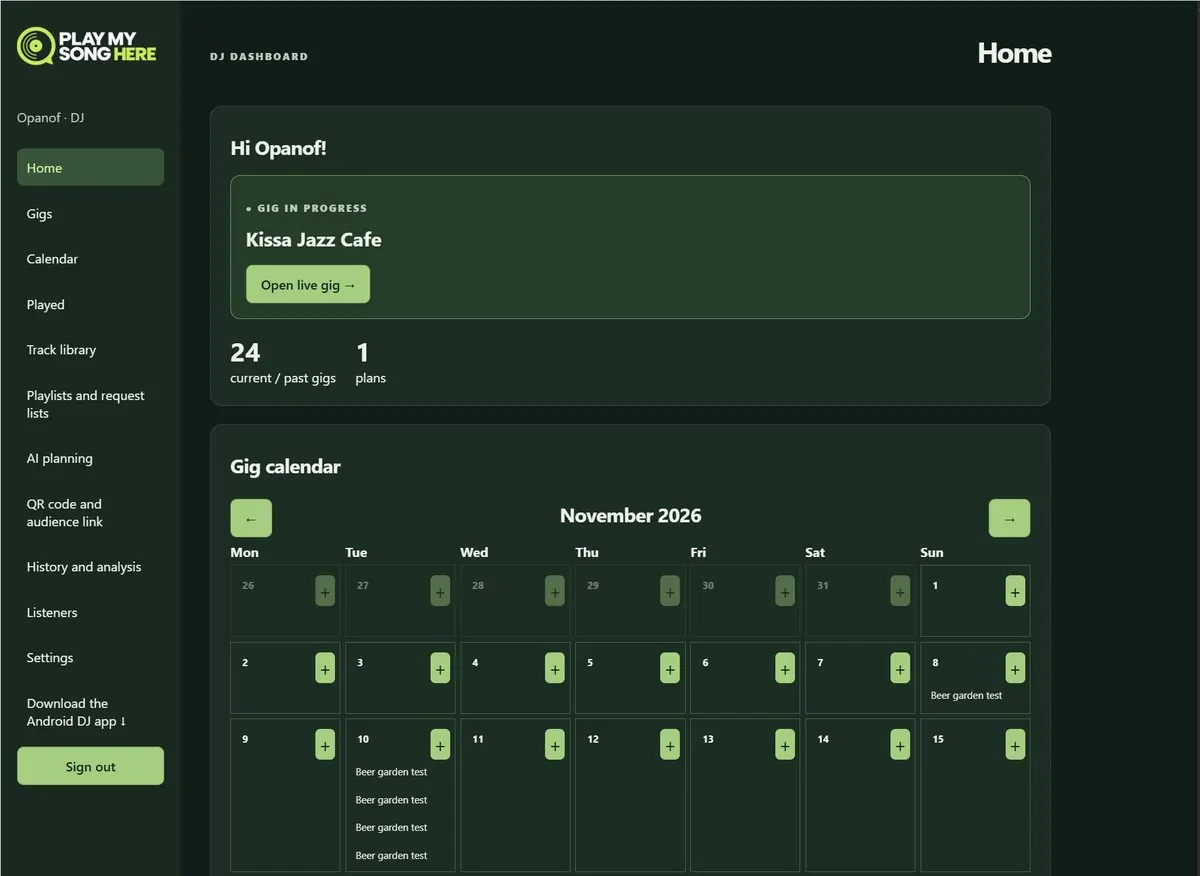
playmysonghere.com · Home
DJ dashboard home: the gig in progress, gig counts and a monthly gig calendar
1
Plan every night ahead
Pick a date to create a gig and set it up in advance for that night: its own playlist and request list, how guests can take part, the timing rules and sharing. Open any gig from the calendar, or jump straight to the one that's live.
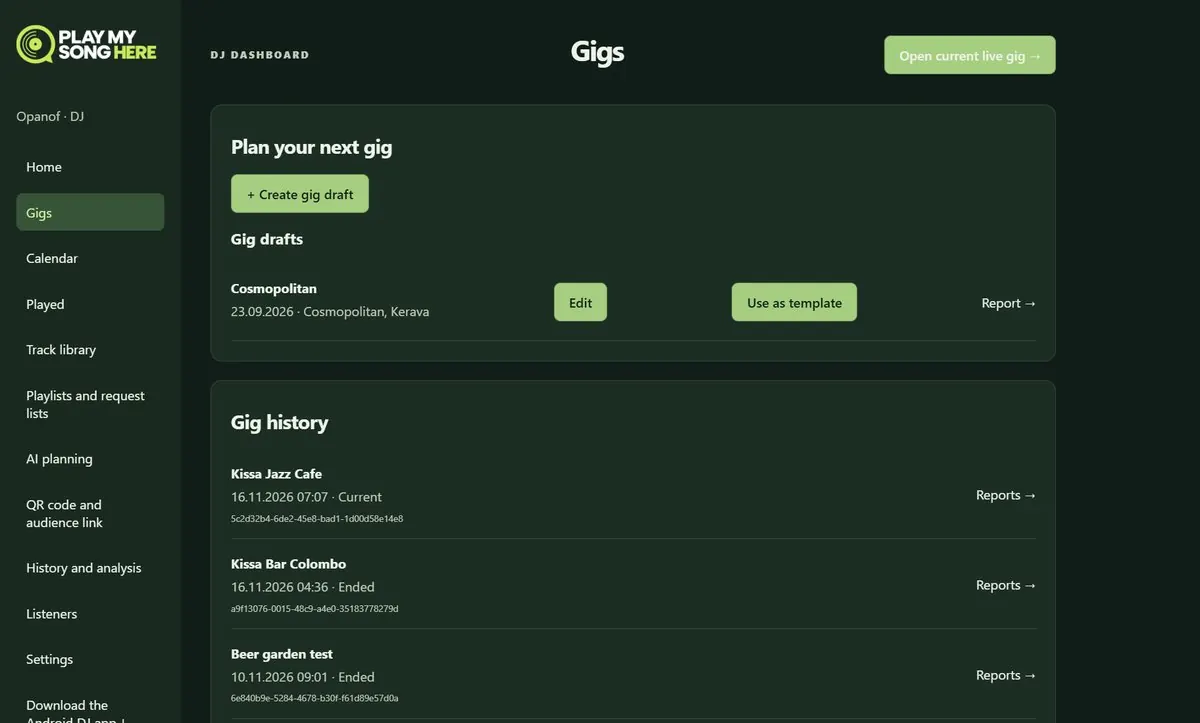
playmysonghere.com · Gigs
Gigs page: create a gig draft, use a past gig as a template, and the gig history with reports
2
Drafts, templates and history
Prepare the next gig in advance or reuse a past one as a template. Every gig keeps its reports.
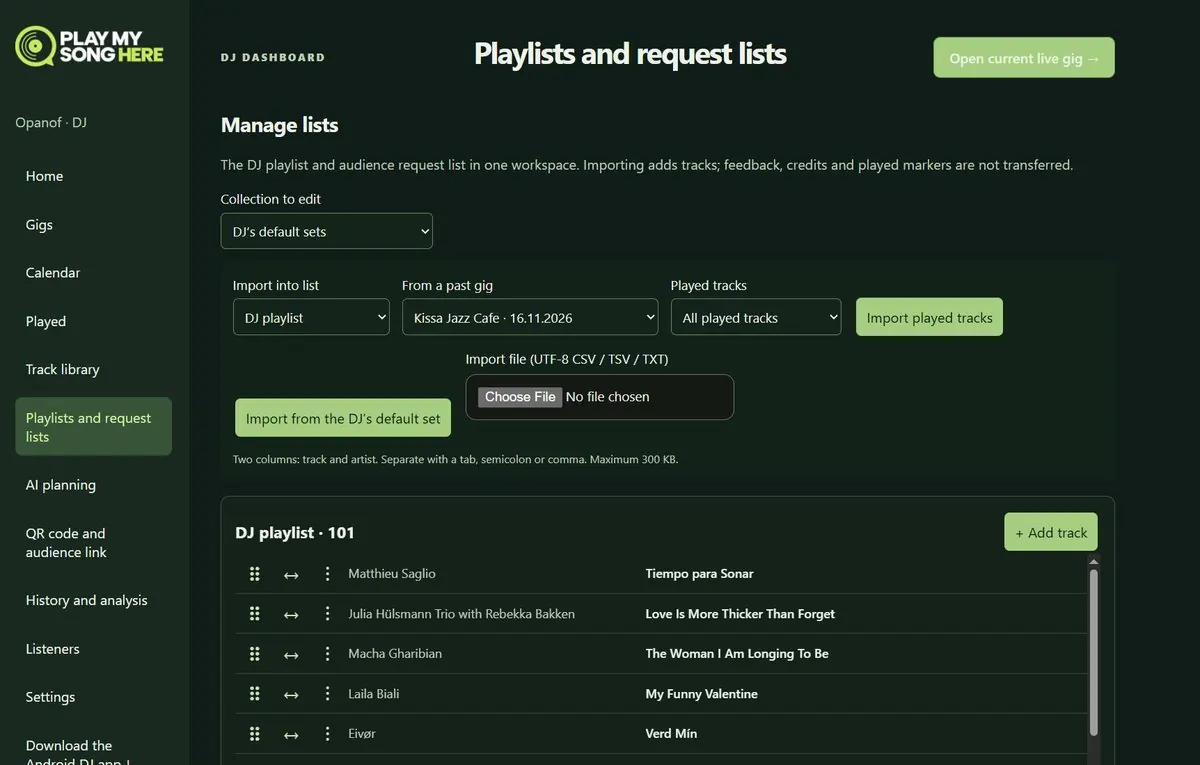
playmysonghere.com · Playlists and request lists
Playlists and request lists: import played tracks from a past gig into the DJ playlist, import from the default set or a file
3
Last night's tracks, next gig's list
Every gig gets its own DJ playlist and audience request list. Fill them from any past gig's played tracks, your default set or a file.
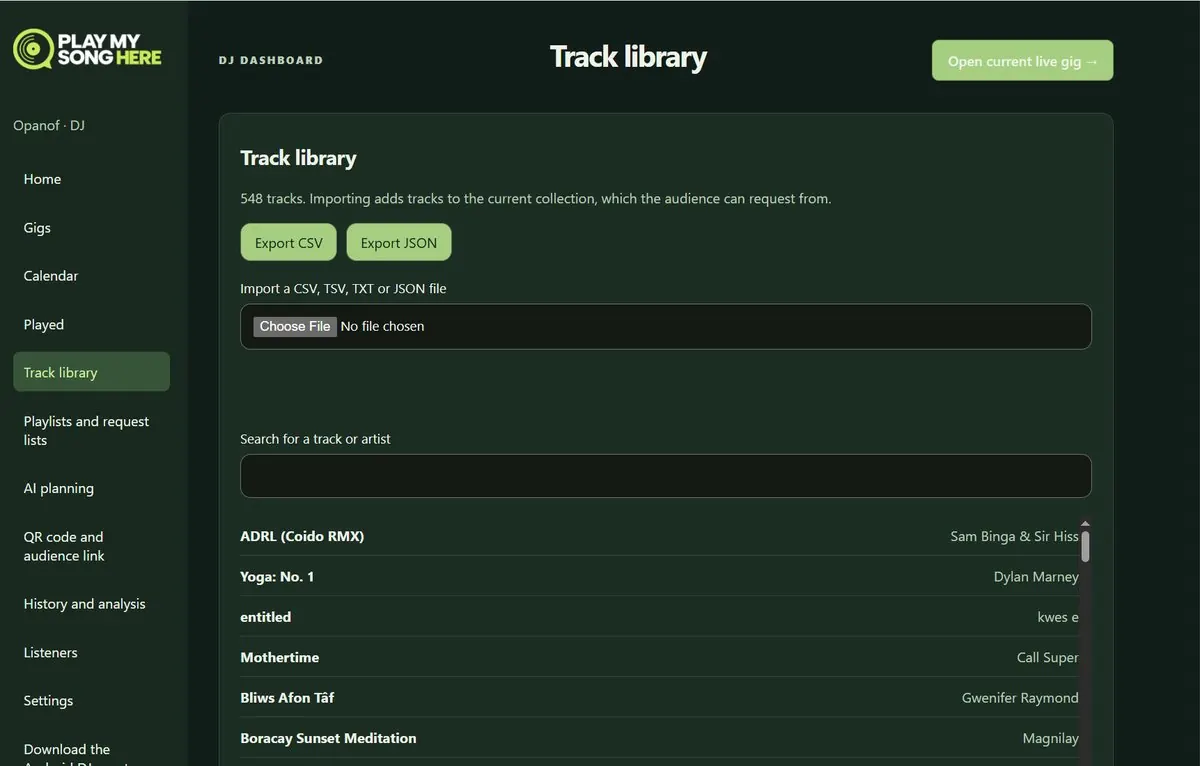
playmysonghere.com · Track library
Track library: export to CSV or JSON, import a CSV, TSV, TXT or JSON file, and search
4
Your whole record bag, searchable
Bring in your whole collection from CSV, TSV, TXT or JSON, search it in seconds, and export it whenever you like.
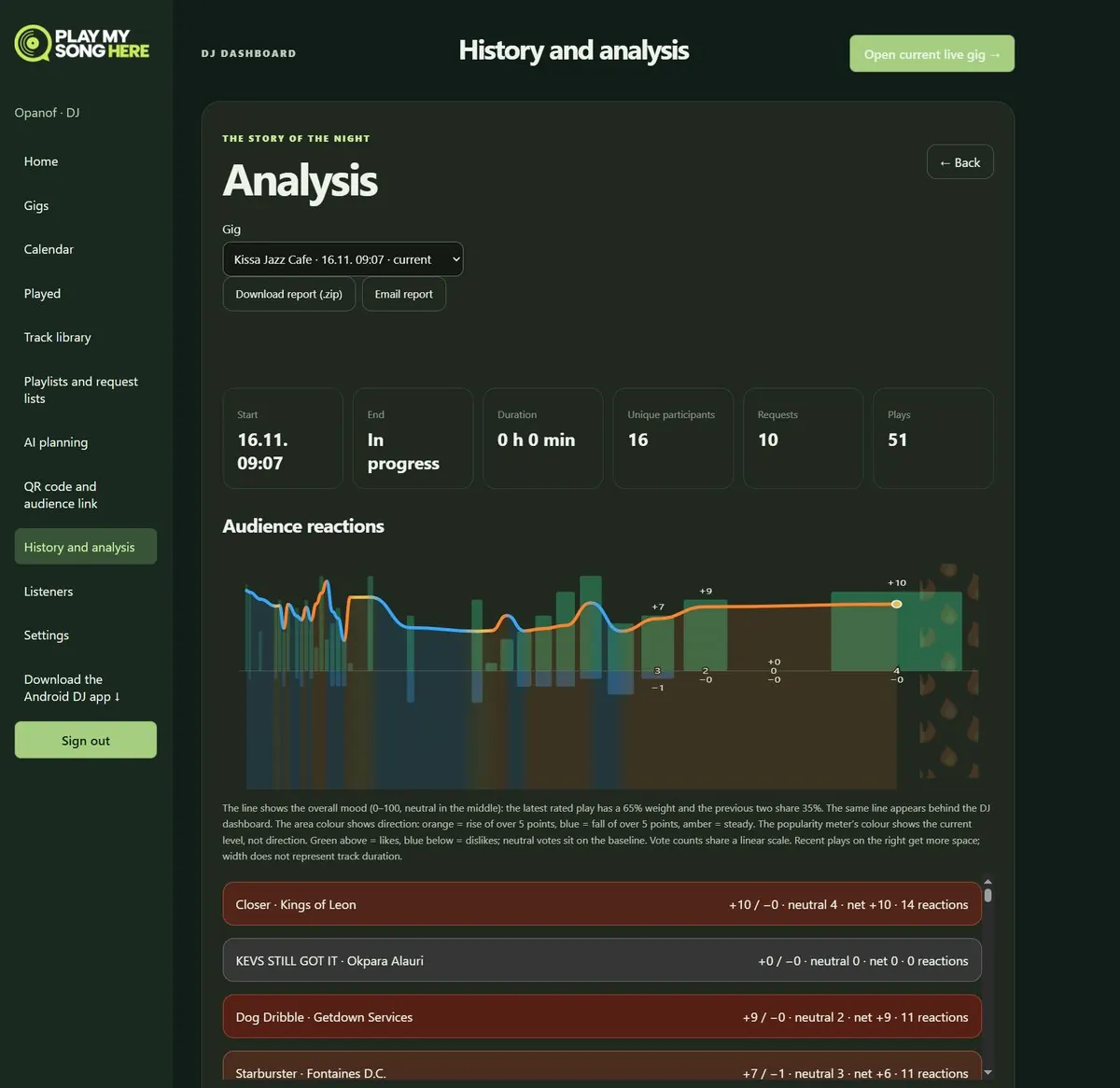
playmysonghere.com · History and analysis
History and analysis: a gig with 16 participants, 10 requests and 51 plays, the audience reactions chart and reactions per track
5
The story of the night
Participants, requests and plays, how every track landed, and the mood through the night. Download the report or email it.
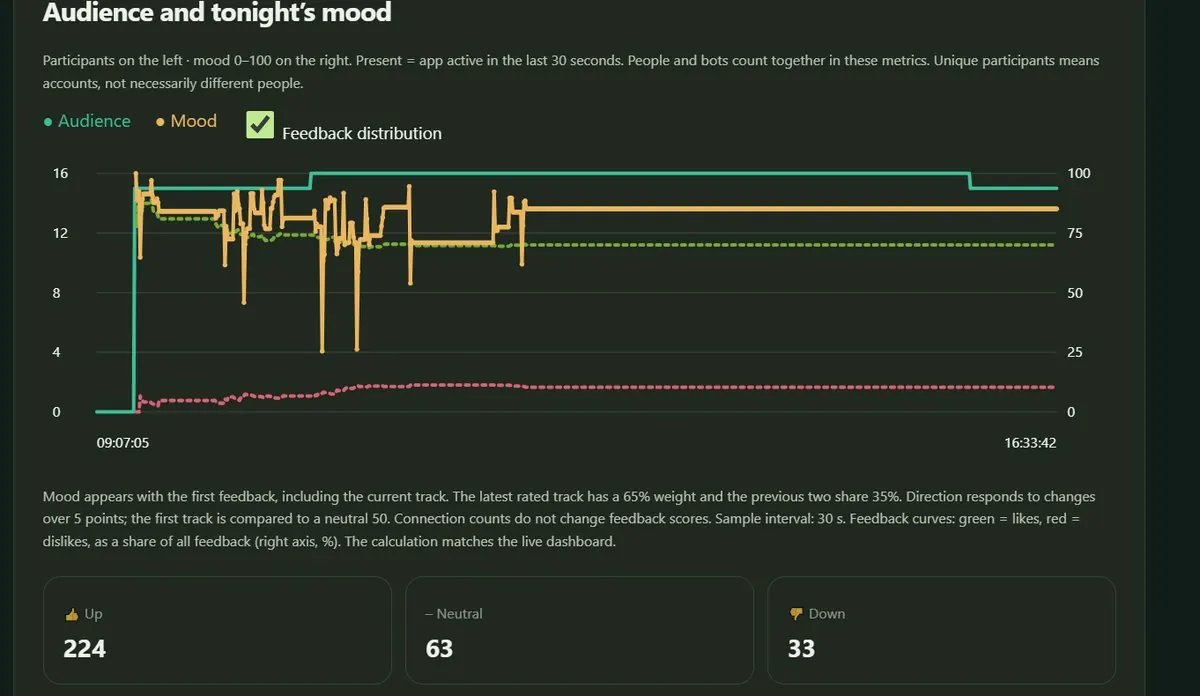
playmysonghere.com · History and analysis
Audience and mood chart through the evening, with 224 up, 63 neutral and 33 down reactions
6
The whole evening in numbers
Who was in the room, how the mood moved, and every thumbs up and down added up.

Also in the dashboard: the played history, AI planning with the night's context, QR codes and audience links, and listener settings.

For venues

Your music night, with your guests in it.

Beach bar, beer garden, pub, club or wedding venue: show one official QR code at the DJ booth, bar or entrance and guests bring their friends in from their own phones. The DJ gets a live line to the room, and you get a clear picture of what your crowd enjoys.

Apply for a pilot

Nothing to install

Guests use their phone's browser. The DJ brings their own phone or tablet.

Works indoors and out

From a basement club to a beach bar with tables in the sand.

The DJ stays in charge

Requests guide the night. They never take it over.

Speaks your guests' language

English, Finnish, German and Swedish. You choose which ones to offer.

Learn your crowd

Reports after each night show what worked.

Every guest in their own language

A dozen countries at the bar. One night together.

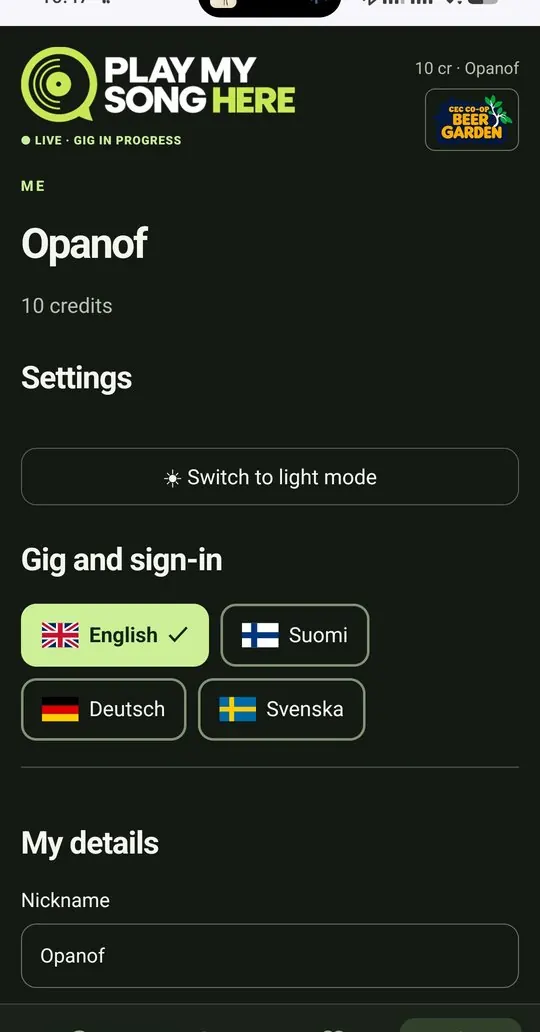
Each guest picks English, Finnish, German or Swedish on their own phone, from the first screen to the last vote. The venue chooses which languages to offer and which one comes first. The DJ dashboard is available in English and Finnish, with English as the default.

EnglishYour crowd. Your call.
SuomiSinun yleisösi. Sinun valintasi.
DeutschDein Publikum. Deine Wahl.
SvenskaDin publik. Ditt val.

More languages can be added as new venues need them.

Guest view, Me tab at CEC CO-OP Beer Garden: language buttons for English, Suomi, Deutsch and Svenska, with English selected

Questions

Good to know.

Something missing? Ask us.

Do guests need an app or an account?

No. Guests open Play My Song Here in their phone's browser and join with a nickname, or with email if they want to keep their history.

Does it work on iPhone?

For guests, yes: any modern phone browser works. The DJ app is available for Android phones and tablets today, and the iOS version is on the way. The full DJ dashboard also runs in any browser.

Do I need Spotify or another streaming service?

No, and that is the point. Play My Song Here is made for DJs who play records: vinyl first, and CDs too. Requests come from your own collection, and recognition in the Android DJ app names each track as it plays, or you pick it by hand.

How do I get my records in?

You only list the records guests can ask for, not your whole collection. Import them from a CSV, TSV, TXT or JSON file, or build the list from tracks you've played before. No typing in records one by one. Coming next: import straight from your Discogs collection, or photograph your shelf and confirm what was found.

How does it hear the records?

The Android DJ app listens through the phone's or tablet's own microphone at the booth and names each track as it plays. No cables to the mixer. If it gets one wrong, you correct it with one tap.

Do guests need internet?

Yes, either mobile data or the venue's Wi-Fi. The QR code opens the gig straight away.

Who takes care of music licences?

Play My Song Here doesn't play or stream any music. The venue's usual public performance licences apply, just as on any other night.

What does it cost?

During the pilot it's free for DJs and venues, and guests use free test credits. Talk to us about your nights and we'll agree the terms for a pilot.

What data do you keep about guests?

What the gig needs: the nickname, requests, backing and votes. Other guests don't see anyone's profile, and friend invites are stored without revealing who invited whom.

Get started

From hello to your first gig.

No extra hardware, no cables, no training. Your phone or tablet and your records are enough.

01

Apply for access

Fill in the short form below. We review every application and confirm your DJ or venue account by email.

02

Get the DJ app

Once approved, download the DJ app for Android from your own DJ dashboard; iOS is coming. Everything else also works in the browser.

03

Create your first gig

Pick a date, choose your lists and rules, and show the official code at the DJ booth, bar or entrance.

Apply for access

Tell us a little about you and your nights. We review every application and reply by email.

Required field

Application privacy notice. We store the details you submit to review your application and contact you about Play My Song Here. We do not sell them or use them for unrelated marketing. Applications are kept for up to 12 months. You can request access or deletion at playmysonghere@gmail.com.
Prefer email? playmysonghere@gmail.com

You know your music.
Get to know your crowd.

Already playing with us? Sign in and get your next gig ready.

DJ sign in

Guests join from any phone browser.

Connection briefly lost. Reconnecting…

Still disconnected. Retrying in seconds.

Could not reconnect.
Try again or refresh the page.

The connection is paused. Resume here.

Could not resume.
Try again or refresh the page.

An error occurred. Reload 🗙